Shares as Margin

Generate instant trading limits using shares in your Demat!

Calculate Limits Now
#margin-calculator

What is Shares As Margin?

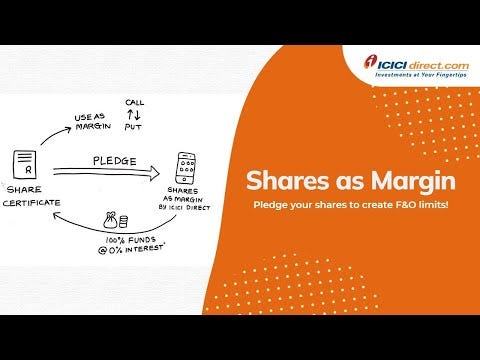
Shares As Margin (SAM) lets you pledge existing shares held in your Demat Holdings to create instant trading limits. These limits can be used to trade in Intraday, MTF, Commodities (only selling/writing) and other leveraged products.

Trading limits generated while pledging shares will be less than the actual value of the stock. The difference between the value of the stock and limit generated is known as haircut and it varies from stock to stock.

How limits are calculated

If the value of shares pledged is Rs. 10,000, and the haircut percentage is 10%, the trading limits created will be

Value of shares pledged

₹ 10,000

Haircut of the stock

(₹ 10,000 X 10%)

Trading Limits

₹ 9,000

Value of shares pledged

Haircut of the stock

Trading Limits

₹ 10,000

(₹ 10,000 X 10%)

₹ 9,000

Key Features

Instant Liquidity
Generate limits of up to 94% of your holding value instantly.
No cash margin requirement
Create positions with 100% of your securities as margin, without providing any upfront cash.
Wide selection of stocks to pledge
Access and select Shares as Margin for up to 1200+ stocks.
Shares as Margin Calculator
Enter Stock Name
Quantity to be pledged
Last Traded Price (LTP)
Haircut
Limits to be Generated
CREATE LIMITS
https://secure.icicidirect.com/trading/fno/shareasmargin/blockcreatelimit
How to Get Research Alerts?
desktop
Desktop
mobile
Mobile
desktop
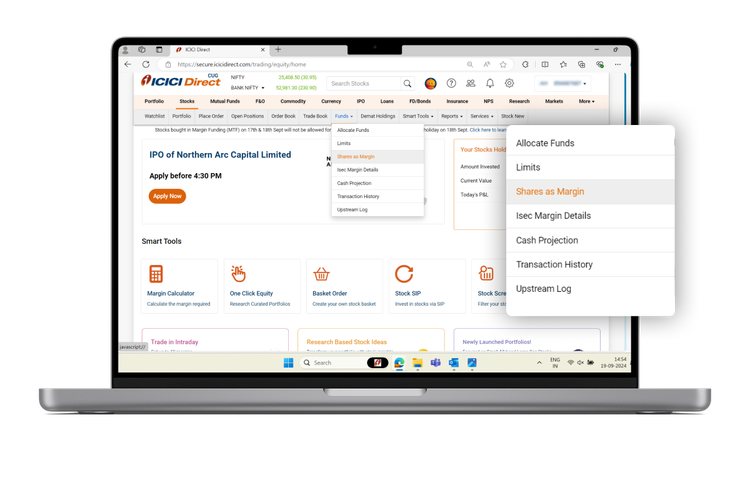
Step 1: Visit Shares as Margin
Under Stocks -> Funds -> Shares as Margin
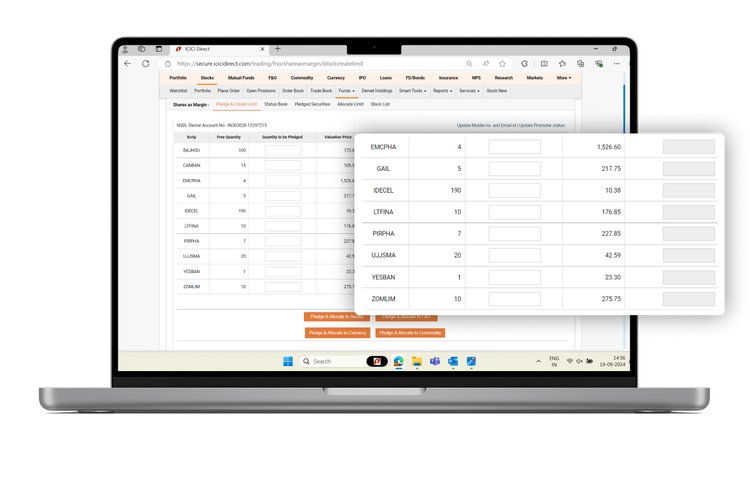
Step 2: Stock Selection
Enter the quantity against the stock which you want to pledge.
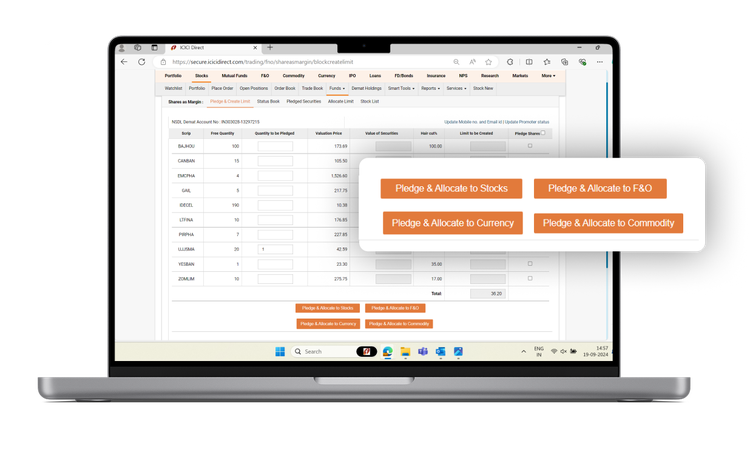
Step 3: Select Segment
Chose the segment in which you want to create limits (Equity, F&O, Commodity, Currency). Please note that you can always change the limits to a different segment later on.
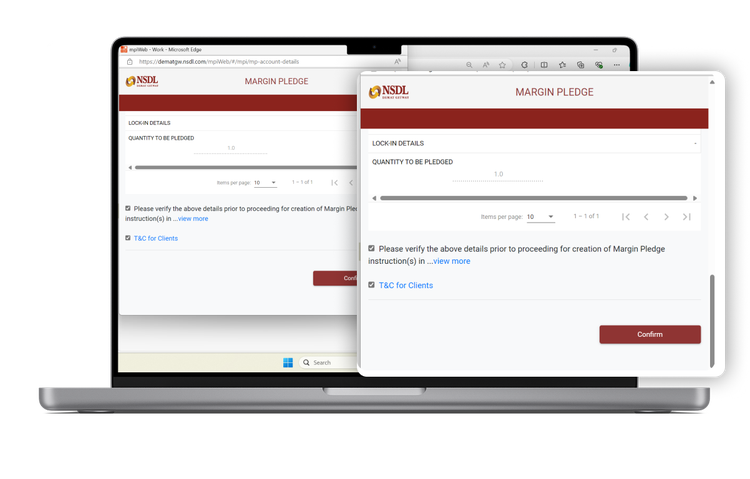
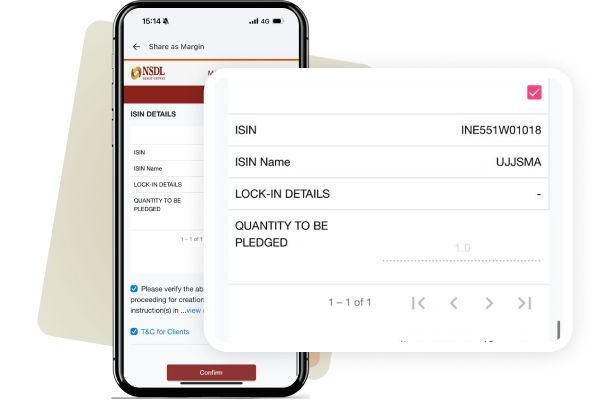
Step 4: Confirm Through OTP
Check the tick box and, enter OTP details and click confirm in the Pop up that appears.
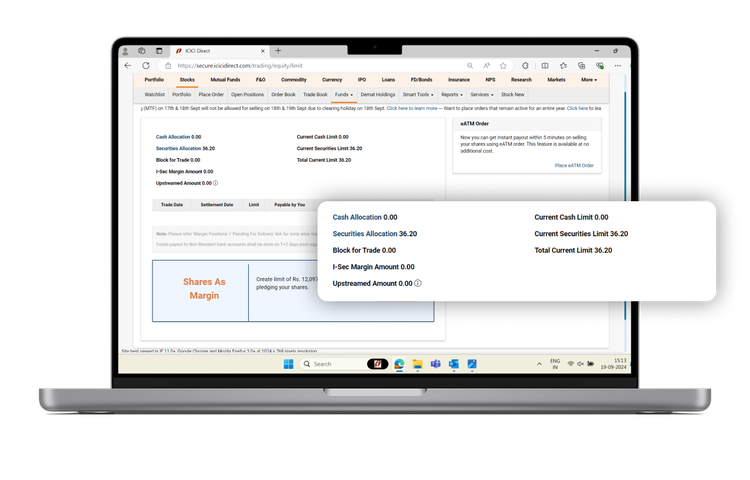
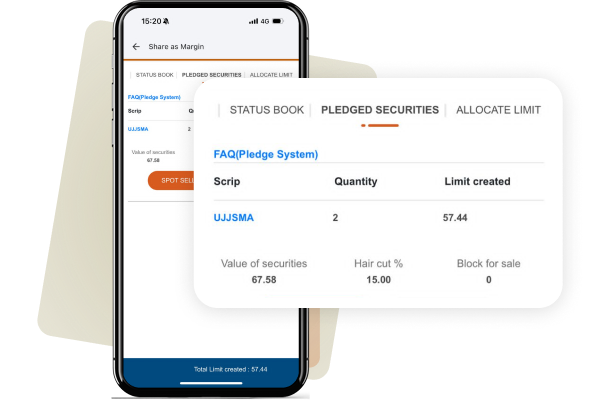
Step 5: Receive Limit & Start Trading
Your trading limit will be created instantly which can be observed under "Securities Allocation" in the Limits page (Stocks -> Funds -> Limits).
mobile
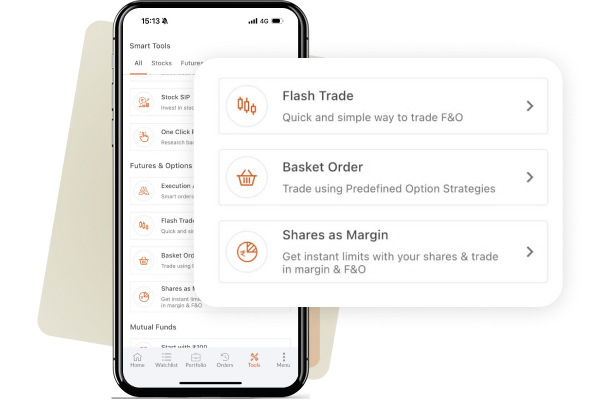
Step 1: Visit Shares as Margin
Home -> Stocks -> Scroll down to Tools & Features -> Shares as Margin
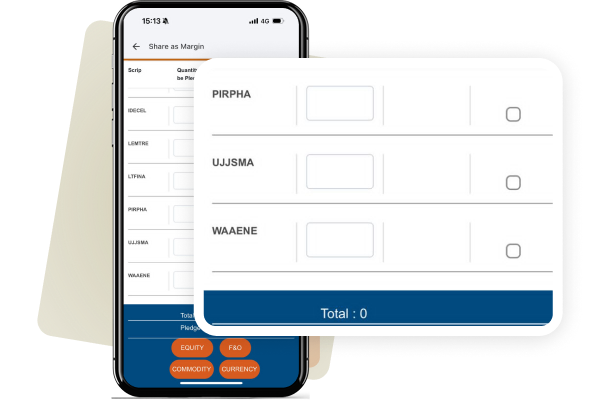
Step 2: Stock Selection
Enter the quantity against the stock which you want to pledge.
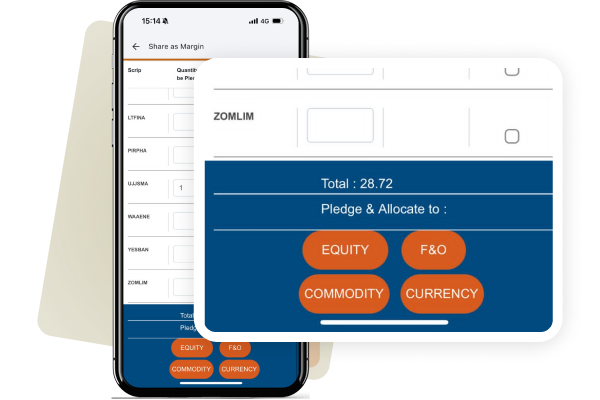
Step 3: Select Segment
Chose the segment in which you want to create limits (Equity, F&O, Commodity, Currency). Please note that you can always change the limits to a different segment later on.
Step 4: Confirm Through OTP
Check the tick box and, enter OTP details and click confirm in the Pop up that appears.
Step 5: Receive Limit & Start Trading
Your trading limit will be created instantly which can be observed under "Securities Allocation" in the Limits page (Stocks -> Funds -> Limits).

Things to note

✓ In case you have both cash and limits in your segment and a buy order is placed, Shares as Margin limits will be blocked first, followed by cash.

✓ You will be charged Rs.29+ GST per security when you pledge/unpledge/invoke your shares.

✓ Whenever a corporate action like Bonus/Split/Merger is announced by a company, the Haircut percentage of the stock may gradually start to increase.

✓ Shares as Margin limits are updated daily based on closing prices and may be revalued during market hours in times of high volatility.

Our Videos

video-cards-item

Investing

For beginner

How to Pledge Shares with Shares as Margin via the ICICI Direct Website
https://www.youtube.com/watch?v=qex0mNjq7Rk
video-cards-item

Investing

For beginner

A Guide to Using Shares as Margin | ICICI Direct
https://www.youtube.com/watch?v=LaS7HQOBesY
video-cards-item

Investing

For beginner

How To Create Additional F&O Trading Limits | Shares As Margin ICICI Direct
https://www.youtube.com/watch?v=_bwIzttwAxY
Frequently Asked Questions
5
What is shares as margin (SAM)?

Shares as Margin allows you to pledge the shares held by you in your Demat account and generate limits against those shares.

The limits generated can be used in:

  • Margin Orders (MTF, Intraday)
  • Futures and Options
  • Commodities
What is shares as margin (SAM)?

Shares as Margin allows you to pledge the shares held by you in your Demat account and generate limits against those shares.

The limits generated can be used in:

  • Margin Orders (MTF, Intraday)
  • Futures and Options
  • Commodities
What is Haircut in Shares As Margin?

While pledging shares, you get a trading limit after reducing a certain value of your holdings. This reduced value is called haircut and it varies from stock to stock.

For example, if the value of shares pledged is worth Rs.10,000 and the haircut of the stock is 20%. The limits created will be 10,000 – 20%* 10,000 = Rs. 8,000.

How much time it takes to generate margin under SAM?
Margins are created instantly after receiving OTP.
What are the applicable Pledge charges for both Margin Trading and Shares as Margin?

The pledge charges for Shares As Margin and MTF is as follows:

  1. Charge for Shares As Margin Pledge Creation/ Closure/ Invocation - Rs.29 + GST
  2. Charge for MTF Pledge Creation/ Closure/ Invocation - Rs.25 + GST
Will my shares as margin funding limits change on a day to day basis?

The value of the limits generated by pledged shares in Shares As Margin depends on the Quantity, Price and Haircut of the stock.

The formula for creation of limits is as follows:

(Quantity of the stock deposited * Price of the stock) * (1 - Haircut% for the stock)

As the price of the stocks varies daily, the corresponding limits that are created by pledging the securities also change.

Generally, the previous day’s closing price is taken as the Valuation Price of the stock. So, if the price of the stock starts to fall, funding limits that are generated by pledging the stock decreases, vice-versa as the price of the stock increases the funding limits are also increased. Limits will also vary due to changes in haircut% of the stock.

Whenever you take positions using Shares As Margin limits and the value of the limits starts to fall. The positions taken using those Shares As Margin limits may get squared off due to lack of sufficient margins.

Therefore, whenever you have taken F&O and Equity positions on the basis of limits arising from Shares As Margin, you are advised to track the prices of stocks and ensure that sufficient margin is always available.

{ "@context": "https://schema.org/", "@type": "HowTo", "name": "How to create limits in Shares as Margin via ICICI Direct Website", "description": "Step-by-step guide to create limits in Shares as Margin online using ICICI Direct platform via website.", "tool": { "@type": "HowToTool", "name": "ICICI Direct Website" }, "step": [{ "@type": "HowToStep", "text": "Visit Shares as Margin", "image": "https://www.icicidirect.com/Content/images/SAM-step1.webp", "name": "Under Stocks -> Funds -> Shares as Margin", "url": "https://www.icicidirect.com/equity-products/shares-as-margin" },{ "@type": "HowToStep", "text": "Stock Selection", "image": "https://www.icicidirect.com/Content/images/SAM-step2.webp", "name": "Enter the quantity against the stock which you want to pledge.", "url": "https://www.icicidirect.com/equity-products/shares-as-margin" },{ "@type": "HowToStep", "text": "Select Segment", "image": "https://www.icicidirect.com/Content/images/SAM-step3.webp", "name": "Chose the segment in which you want to create limits (Equity, F&O, Commodity, Currency). Please note that you can always change the limits to a different segment later on.", "url": "https://www.icicidirect.com/equity-products/shares-as-margin" },{ "@type": "HowToStep", "text": "Confirm Through OTP", "image": "https://www.icicidirect.com/Content/images/SAM-step4.webp", "name": "Check the tick box and, enter OTP details and click confirm in the Pop up that appears.", "url": "https://www.icicidirect.com/equity-products/shares-as-margin" },{ "@type": "HowToStep", "text": "Receive Limit & Start Trading", "image": "https://www.icicidirect.com/Content/images/SAM-step5.webp", "name": "Your trading limit will be created instantly which can be observed under Securities Allocation in the Limits page (Stocks -> Funds -> Limits).", "url": "https://www.icicidirect.com/equity-products/shares-as-margin" }] }
{ "@context": "https://schema.org/", "@type": "HowTo", "name": "How to create limits in Shares as Margin via ICICI Direct App", "description": "Step-by-step guide to create limits in Shares as Margin online using ICICI Direct platform via app.", "tool": { "@type": "HowToTool", "name": "ICICI Direct Mobile App" }, "step": [{ "@type": "HowToStep", "text": "Visit Shares as Margin", "image": "https://www.icicidirect.com/Content/images/SAM-mob-step1.webp", "name": "Under Stocks -> Funds -> Shares as Margin", "url": "https://www.icicidirect.com/equity-products/shares-as-margin" },{ "@type": "HowToStep", "text": "Stock Selection", "image": "https://www.icicidirect.com/Content/images/SAM-mob-step2.webp", "name": "Enter the quantity against the stock which you want to pledge.", "url": "https://www.icicidirect.com/equity-products/shares-as-margin" },{ "@type": "HowToStep", "text": "Select Segment", "image": "https://www.icicidirect.com/Content/images/SAM-mob-step3.webp", "name": "Chose the segment in which you want to create limits (Equity, F&O, Commodity, Currency). Please note that you can always change the limits to a different segment later on.", "url": "https://www.icicidirect.com/equity-products/shares-as-margin" },{ "@type": "HowToStep", "text": "Confirm Through OTP", "image": "https://www.icicidirect.com/Content/images/SAM-mob-step4.webp", "name": "Check the tick box and, enter OTP details and click confirm in the Pop up that appears.", "url": "https://www.icicidirect.com/equity-products/shares-as-margin" },{ "@type": "HowToStep", "text": "Receive Limit & Start Trading", "image": "https://www.icicidirect.com/Content/images/SAM-mob-step5.webp", "name": "Your trading limit will be created instantly which can be observed under Securities Allocation in the Limits page (Stocks -> Funds -> Limits).", "url": "https://www.icicidirect.com/equity-products/shares-as-margin" }] }

*Please note Brokerage would not exceed the SEBI prescribed limit.