Pre-set your Orders, Execute at the Right Moment

Good Till Triggered (GTT) Order

Good Till Trigger (GTT) is an order that allows you to place buy or sell orders at your preferred price, staying active for up to 365 days or until triggered.

365-Day Validity

The order remains active until the set price is reached.

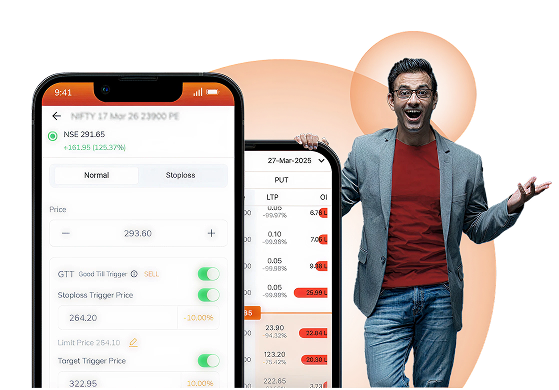
Target and Stoploss at one go

Set target and stoploss prices simultaneously, ensuring that you are covered regardless of market direction.

Set at Desired Price

Trigger and Limit prices for GTT orders can be set beyond the stock’s price band.

false

When to Place a GTT Order?

  • When you want to buy a stock at a specific price.
  • When you wish to sell stocks from your portfolio at a favourable price by setting both Target as well as Stoploss.
  • When you buy stocks and want to set both Target and Stoploss upfront to sell them at your preferred price later.

Types of GTT Order?

Single order

Set a trigger price for buy/sell orders. If the stock hits the trigger price, the limit order will be sent to exchange.

One-Cancels-the-Other

Place both Target & Stoploss for sell order. If one executes, the other cancels automatically.

3-legged order

Buy a stock and simultaneously place a GTT sell order with predefined Stoploss and Target.
How to Place a GTT Order?
single-mobile-app
Single - Mobile App
single-desktop
Single - Desktop
3-legged-mobile-app
3-legged - Mobile App
3-legged-desktop
3-legged - Desktop
single-mobile-app
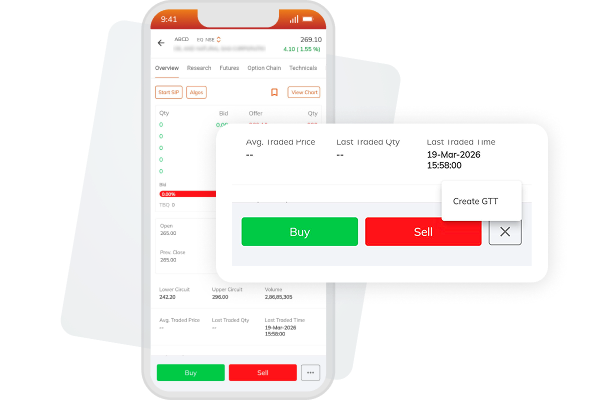
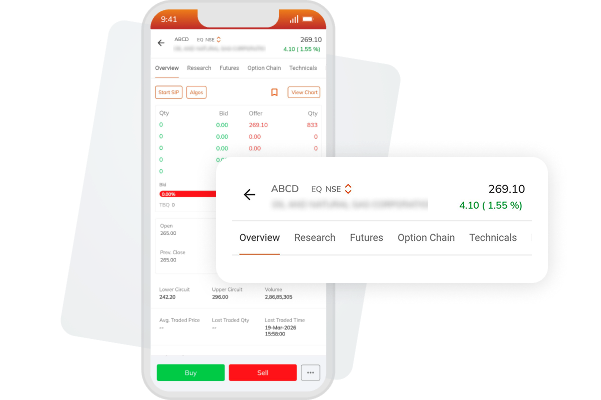
Step 1: Select the stock you wish to buy/sell
Step 2: Select Create GTT option from the 3 dots beside "Buy & Sell" button
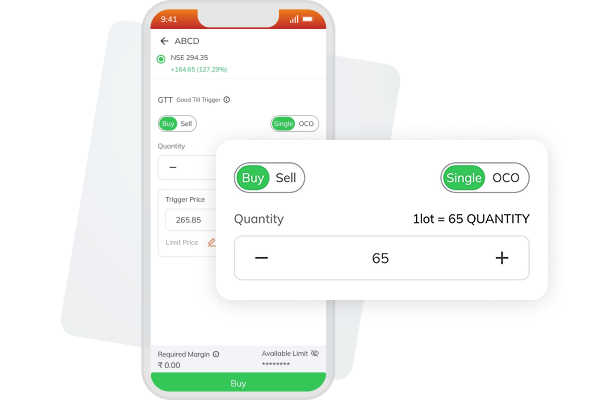
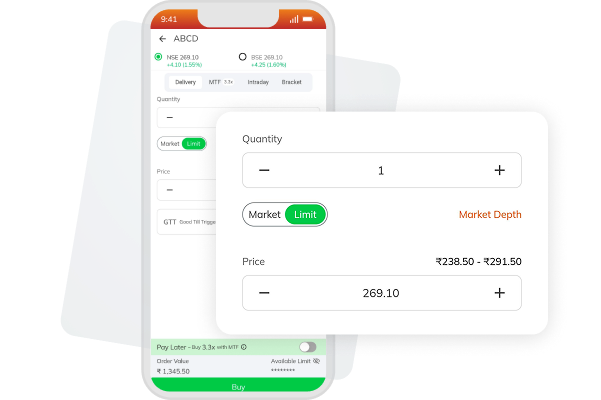
Step 3: Enter the order details
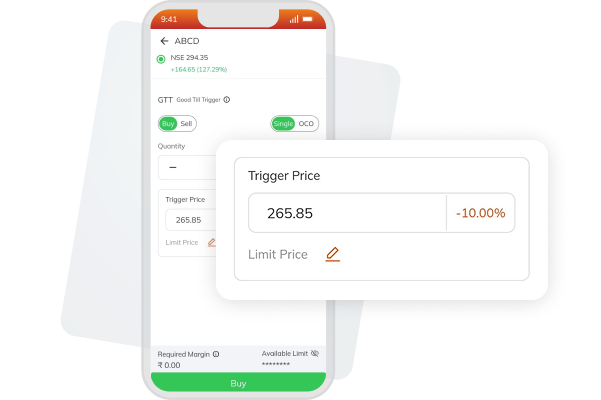
Step 4: Set your desired Trigger and Limit Price
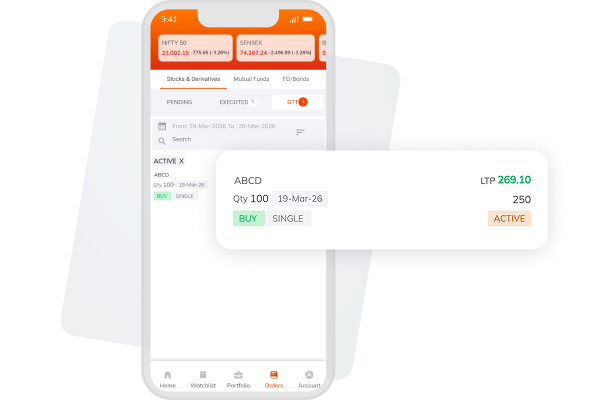
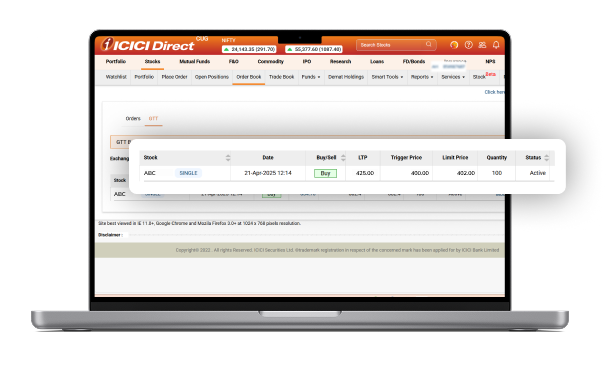
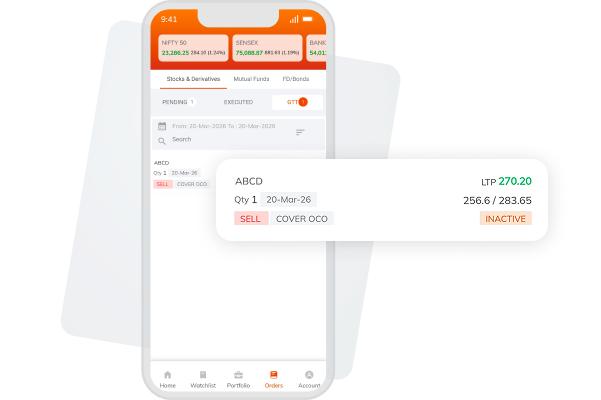
Step 5: View your GTT orders under Order > GTT
single-desktop
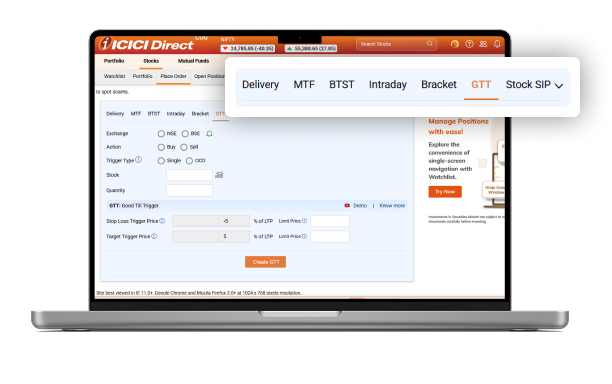
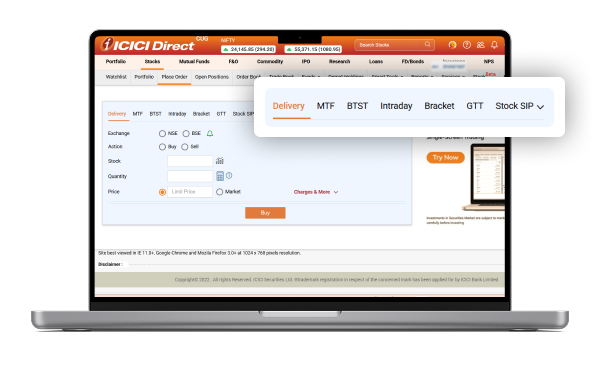
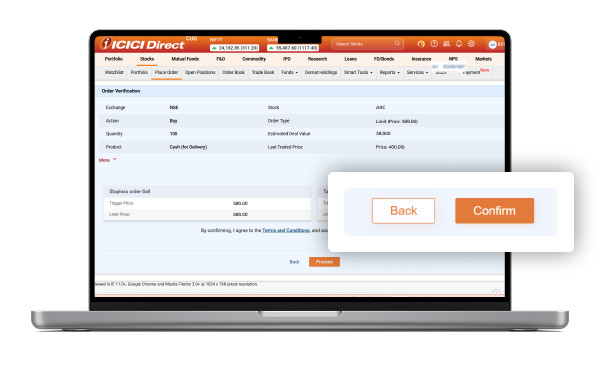
Step 1: Go to Place Order page and select GTT
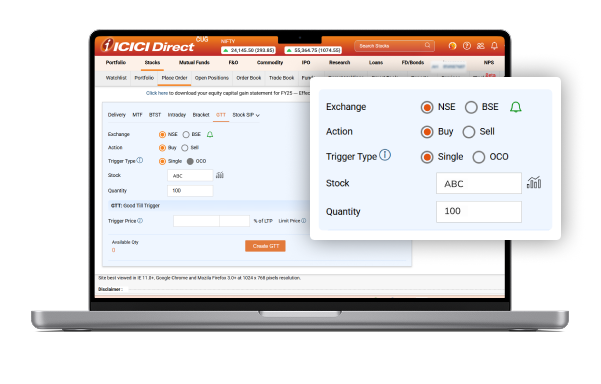
Step 2: Enter order details and select Single as Trigger Type
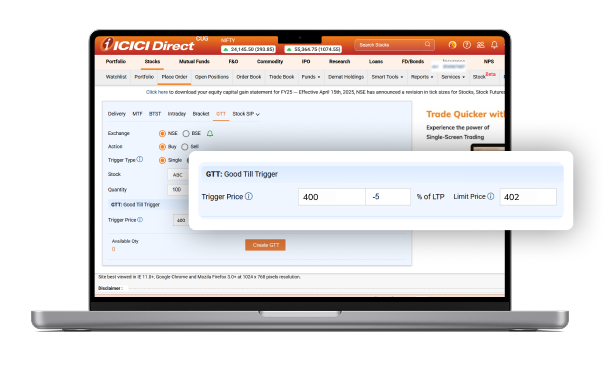
Step 3: Set your desired Trigger and Limit Price
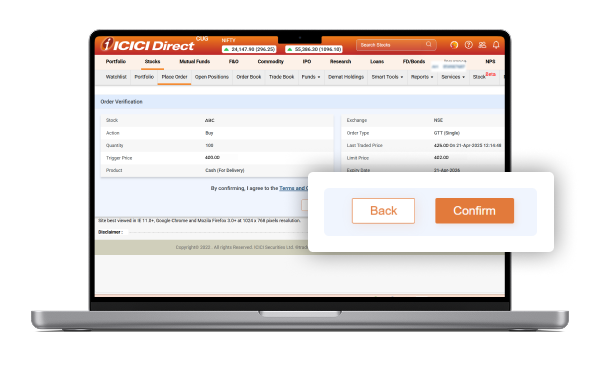
Step 4: Click "Create GTT" and confirm to place the order
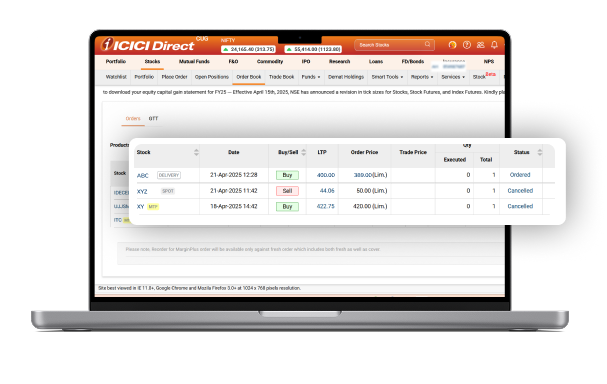
Step 5: View your placed orders at Order Book > GTT
3-legged-mobile-app
Step 1: Select the stock you wish to buy
Step 2: Enter the buy order details
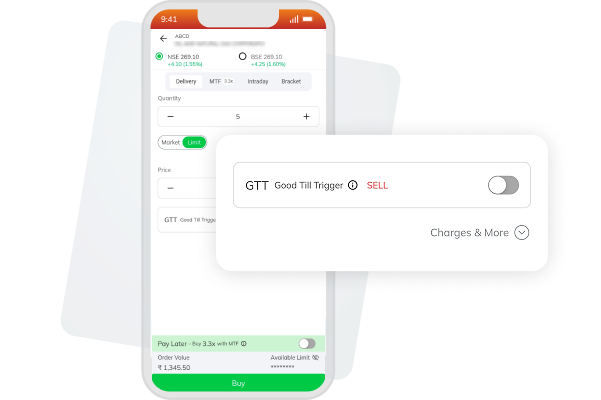
Step 3: Enable GTT sell toggle
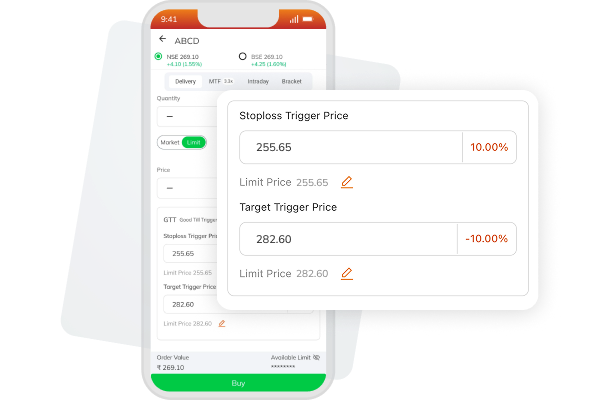
Step 4: Set your desired Trigger and Limit Price
Step 5: View your GTT orders under Order > GTT
3-legged-desktop
Step 1: Go to Place Order page
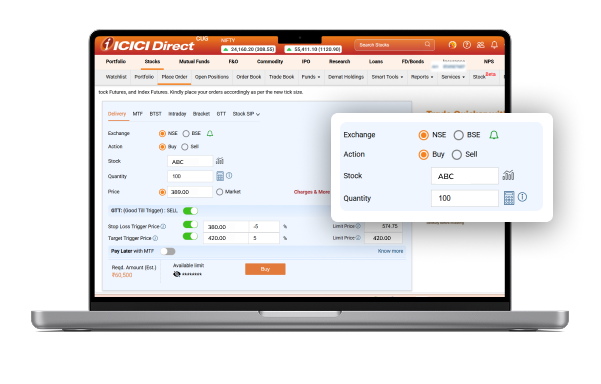
Step 2: Enter order details and enable GTT sell
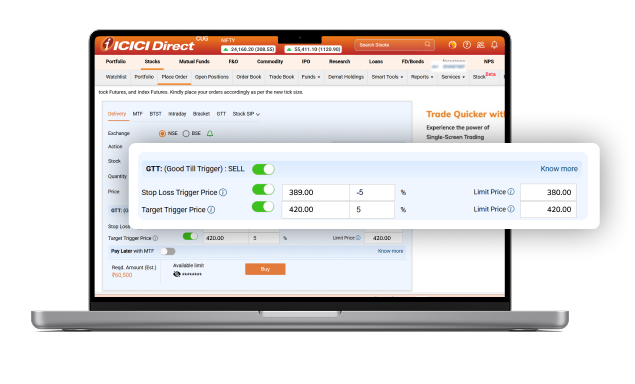
Step 3: Set the desired Buy Price, along with Stoploss and Target Trigger Price
Step 4: Click Buy and confirm the order
Step 5: View your placed orders at Order Book > Orders

GTT vs Delivery

h3
true
threeCol
Offering
GTT
Delivery
Order Validity
Valid up to 365 days or until the trigger condition is met
Valid only for the same trading day
Execution Method
Executes only when the set trigger price is reached
Executes immediately when the market/limit price is reached
Automation
Fully automated
Manual
Monitoring Requirement
No monitoring required as orders are auto executed based on the set price
Requires constant attention on a daily basis to execute at the right time
Ideal Use Case
For planned entries/exits, long-term strategies, and risk management
For immediate buying/selling based on market price

Things to Remember

Our Videos

VIEW ALL VIDEOS
video-cards-item

Investing

For beginner

How to Place GTT Orders on ICICI Direct
https://www.icicidirect.com/ilearn/nri/videos/how-to-place-gtt-orders-on-icici-direct
video-cards-item

Investing

For beginner

How to use GTT with Breeze API | ICICI Direct
https://www.youtube.com/watch?v=0vBr1vDaq9Y
video-cards-item

Investing

For beginner

How to Place GTT Orders via the ICICI Dir
https://www.icicidirect.com/hindi/ilearn/nri/videos/how-to-place-gtt-orders-via-the-icici-direct-watchlist
Frequently Asked Questions
5
What is the validity of GTT order?

A GTT order remains valid for 365 days from the date of placement.

  • The order will be executed automatically if the stock price reaches the set trigger price within this period.
  • If the trigger price is not reached within 365 days, the order will become expired.
What is the validity of GTT order?

A GTT order remains valid for 365 days from the date of placement.

  1. The order will be executed automatically if the stock price reaches the set trigger price within this period.
  2. If the trigger price is not reached within 365 days, the order will become expired.
Can I place GTT orders in MTF?
Yes, you can place GTT orders in MTF.
Do I need to allocate funds for placing GTT request?

No, you do not need to allocate funds while placing a GTT request..

However, when the GTT order is triggered, you must ensure that sufficient funds or margin are available in your trading account to successfully execute the order. If funds are insufficient at the time of execution, the order may be rejected.

Can I modify the trigger or limit price of a GTT request?
Yes, you can modify the Trigger Price (Stop Loss/Target) and the Limit Price of your GTT request anytime before it is triggered. This can be done directly from the GTT Order Book.
{ "@context": "https://schema.org/", "@type": "HowTo", "name": "How to Place a Single GTT Order?", "description": "Step-by-step guide to place a single GTT order online using ICICI Direct platform via website and app.", "tool": { "@type": "HowToTool", "name": "ICICI Direct Website or Mobile App" }, "step": [{ "@type": "HowToStep", "text": "Go to Place Order Page and Select GTT", "image": "https://www.icicidirect.com/Content/images/gtt_single_step1.webp", "name": "Navigate to Place Order Page and Click on GTT", "url": "https://www.icicidirect.com/equity-products/gtt-order" },{ "@type": "HowToStep", "text": "Enter Order Details and Select Single as Trigger Type", "image": "https://www.icicidirect.com/Content/images/gtt_single_step2.webp", "name": "Mention the Order Details and Click on Single as Trigger Type", "url": "https://www.icicidirect.com/equity-products/gtt-order" },{ "@type": "HowToStep", "text": "Select Your Desired Trigger and Limit Price", "image": "https://www.icicidirect.com/Content/images/gtt_single_step3.webp", "name": "Click on the Desired Trigger and Limit Price", "url": "https://www.icicidirect.com/equity-products/gtt-order" },{ "@type": "HowToStep", "text": "Click Create GTT and Confirm to Place the Order", "image": "https://www.icicidirect.com/Content/images/gtt_single_step4.webp", "name": "Select Create GTT and Confirm to Place the Order", "url": "https://www.icicidirect.com/equity-products/gtt-order" },{ "@type": "HowToStep", "text": "View Your Place Orders at Order Book > GTT", "image": "https://www.icicidirect.com/Content/images/gtt_single_step5.webp", "name": "See Your Orders at Order Book > GTT", "url": "https://www.icicidirect.com/equity-products/gtt-order" }] }
{ "@context": "https://schema.org/", "@type": "HowTo", "name": "How to Place a GTT Order?", "description": "Step-by-step guide to place a OCO GTT order online using ICICI Direct platform via website and app.", "tool": { "@type": "HowToTool", "name": "ICICI Direct Website or Mobile App" }, "step": [{ "@type": "HowToStep", "text": "Go to Place Order Page and Select GTT", "image": "https://www.icicidirect.com/Content/images/gtt_oco_step1.webp", "name": "Navigate to Place Order Page and Click on GTT", "url": "https://www.icicidirect.com/equity-products/gtt-order" },{ "@type": "HowToStep", "text": "Enter Order Details and Select OCO as Trigger Type", "image": "https://www.icicidirect.com/Content/images/gtt_oco_step2.webp", "name": "Mention the Order Details and Click on OCO as Trigger Type", "url": "https://www.icicidirect.com/equity-products/gtt-order" },{ "@type": "HowToStep", "text": "Select Your Desired Stoploss and Target Trigger Price", "image": "https://www.icicidirect.com/Content/images/gtt_oco_step3.webp", "name": "Click on the Desired Stoploss and Target Trigger Price", "url": "https://www.icicidirect.com/equity-products/gtt-order" },{ "@type": "HowToStep", "text": "Click Create GTT and Confirm to Place the Order", "image": "https://www.icicidirect.com/Content/images/gtt_oco_step4.webp", "name": "Select Create GTT and Confirm to Place the Order", "url": "https://www.icicidirect.com/equity-products/gtt-order" },{ "@type": "HowToStep", "text": "View Your Place Orders at Order Book > GTT", "image": "https://www.icicidirect.com/Content/images/gtt_oco_step5.webp", "name": "See Your Orders at Order Book > GTT", "url": "https://www.icicidirect.com/equity-products/gtt-order" }] }
{ "@context": "https://schema.org/", "@type": "HowTo", "name": "How to Place a 3-legged GTT Order?", "description": "Step-by-step guide to place a 3-legged GTT order online using ICICI Direct platform via website and app.", "tool": { "@type": "HowToTool", "name": "ICICI Direct Website or Mobile App" }, "step": [{ "@type": "HowToStep", "text": "Go to Place Order Page", "image": "https://www.icicidirect.com/Content/images/gtt_3leg_step1.webp", "name": "Navigate to Place Order Page.", "url": "https://www.icicidirect.com/equity-products/gtt-order" },{ "@type": "HowToStep", "text": "Enter Order Details and Enable GTT Sell", "image": "https://www.icicidirect.com/Content/images/gtt_3leg_step2.webp", "name": "Mention the Order Details and Click on GTT Sell", "url": "https://www.icicidirect.com/equity-products/gtt-order" },{ "@type": "HowToStep", "text": "Set the Desired Buy Price, along with Stoploss and Target Trigger Price", "image": "https://www.icicidirect.com/Content/images/gtt_3leg_step3.webp", "name": "Click on the Desired Buy Price, along with Stoploss and Target Trigger Price", "url": "https://www.icicidirect.com/equity-products/gtt-order" },{ "@type": "HowToStep", "text": "Click Buy and Confirm the Order", "image": "https://www.icicidirect.com/Content/images/gtt_3leg_step4.webp", "name": "Select Buy and Confirm to Place the Order", "url": "https://www.icicidirect.com/equity-products/gtt-order" },{ "@type": "HowToStep", "text": "View Your Place Orders at Order Book > Orders", "image": "https://www.icicidirect.com/Content/images/gtt_3leg_step5.webp", "name": "See Your Orders at Order Book > Orders", "url": "https://www.icicidirect.com/equity-products/gtt-order" }] }

*Please note Brokerage would not exceed the SEBI prescribed limit.