General Queries
How to Add/ Change Bank account in my ICICI Direct account?
You can easily add/ Change bank account online using following steps.
1) Login to ICICIDirect.com website
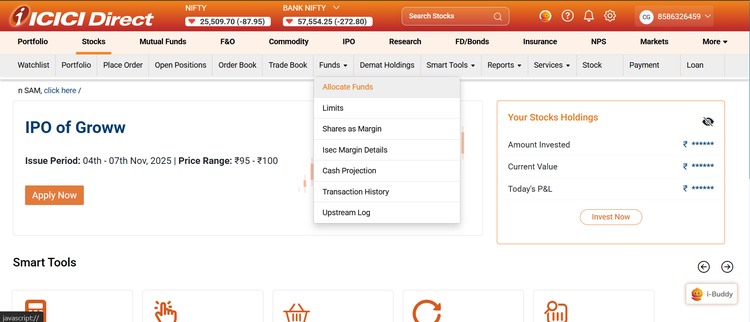
2) Go to Stocks >> Funds >> Allocate Funds
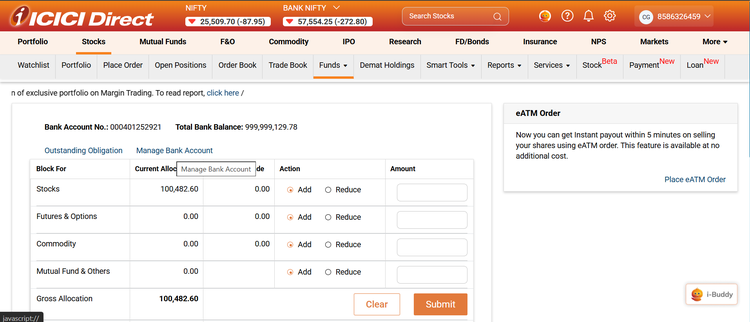
3) Select Manage Bank Account
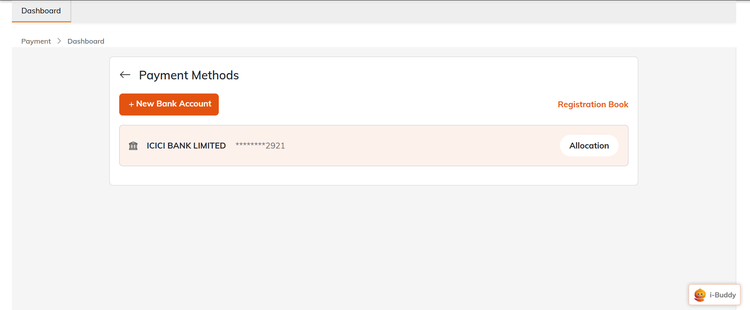
4) Select New Bank Account
5) All ICICI Bank accounts will be fetched using your registered PAN number.
6) Select the Bank account you wish to Add.
7) Details of the selected Bank account will be displayed. Select the consent and click on confirm. The bank account you select will be linked to your Demat account, and all the future dividends will be credited to this account.
8) The Customer needs to complete an eSign. Please note- If the new bank account has a joint holder, then ‘e-sign’ is mandatory for all the holders to complete the bank addition process
9) Click on the consent box and enter your Aadhaar number on protean website. Enter the OTP that you receive on your Aadhaar linked mobile number.
10) The process to Add/change your bank account is now complete. You will be notified via Email and Notification after successful change of bank account. Please note – If you are already in block (3-in-1) model, then your new bank account will be converted in block (3-in-1) model within 5 mins. If you were in deposit (2-in1) model, your new bank account will convert to block (3-in-1) model in T+1 day.