General
How can I add a nominee to my ICICI Direct Trading and Demat account online (Website)?
You can add a nominee to your ICICI Direct Trading and Demat account online in just a few easy steps:
1. Log in to https://secure.icicidirect.com
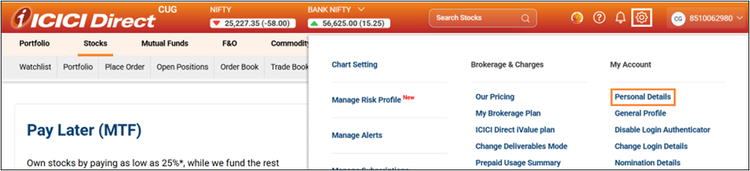
2. Click on Settings
3. Select Personal Details
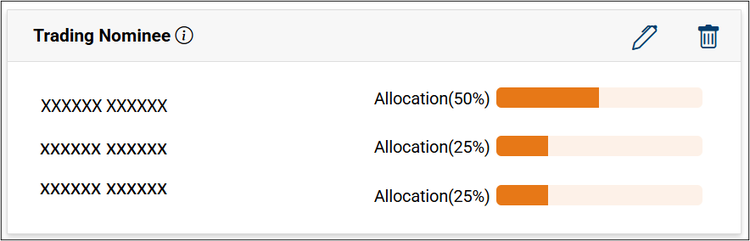
4. Scroll down to Trading Nominee and click on the edit icon
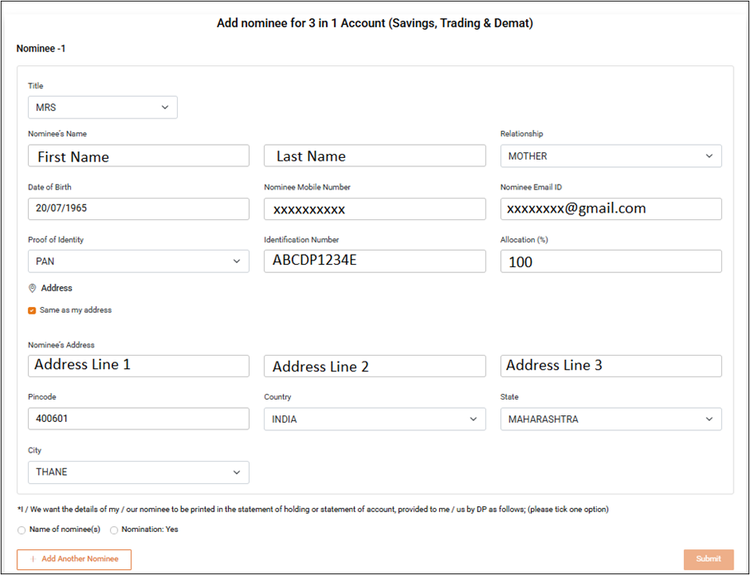
5. Enter nominee details. You can add up to 3 nominees using the “+ Add Another Nominee” button.
Details required:
• Title
• First Name and Last Name
• Relationship with Nominee
• Nominee’s Date of Birth
• Mobile Number and Email ID
• Proof of Identity (PAN, Aadhaar, or Passport)
• Identification Number
• Allocation percentage (Enter 100% if there’s only one nominee)
• Choose which nominee details should appear in your statement of holdings or statement of account
6. Submit the nominee details.
After submitting the nomination form, your nominee will be added automatically to your Trading and Demat account.
If your Demat account has joint holders, nominees will be added only to your Trading account.

Important:
• The nominee’s name must match the ID proof to ensure smooth claim settlement.
• Joint account holders can add nominees only offline by submitting a signed physical nomination form at the nearest Demat-enabled ICICI Bank branch.
• If the nominee is a minor, you must mention the guardian’s details. You cannot be the guardian of your own nominee.