Turnover Statements
Where can I check my turnover statement for futures and options?
There are two ways to check your F&O turnover statement:
Path 1:
1. Log in to your ICICI-Direct account
2. Click on the portfolio tab
3. Under the portfolio >> In Statements and reports
4. You will find the F&O Turnover Statement
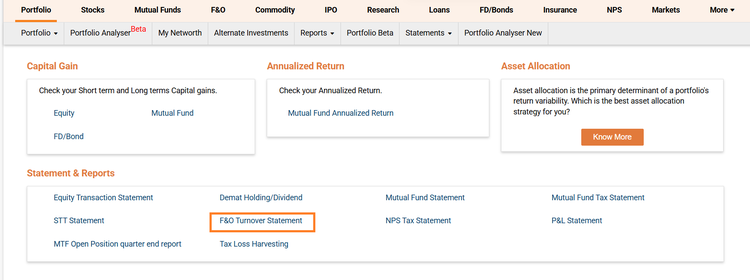
You can download your turnover statement by clicking on the F&O Turnover Statement
The below section will appear:
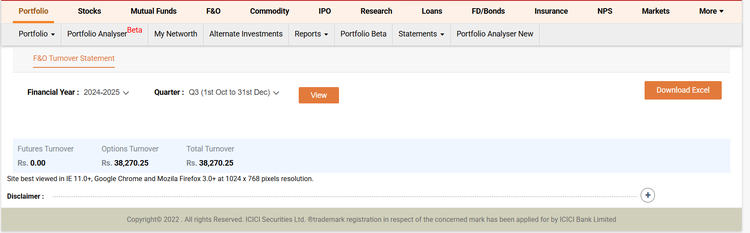
You can download your turnover statement for every quarter separately by clicking on download excel.
The turnover statement is update on weekly basis as well.
Note: Your F&O Turnover Statement is updated on a weekly basis and the details for the ongoing quarter includes transactions up to the end of the previous week.
For example, the statement downloaded on 25th February,Q4( January-March) will display data from 1st January to 20th February.
Path 2:
1. Log in to your ICICI-Direct account
2. Click on F&O Tab
3. Click on Reports
4. Click on F&O Turnover Statement