General
How to activate F&O / Derivatives segment on ICICI Direct?
Follow the below mentioned steps to activate your F&O segment easily on ICICI Direct:
Step 1:
Log in to ICICIdirect.com and click on F&O tab.
Step 2:
Accept F&O Terms & Condition which appears after you log in and click on F&O Tab.
You can also accept T&C from "Terms & Conditions" tab in Settings.
Click on “I Accept”
Step 3:
Accept F&O product Declaration which appears after you log in and click on F&O Tab. Click on “I Accept”
Step 4:
After accepting T&C and Product Declaration , below page will appear.
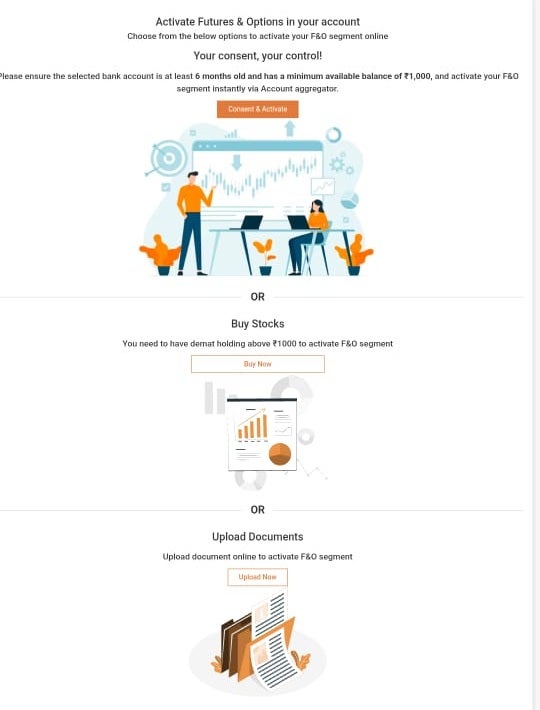
There are 3 ways by which a user can activate F&O:
I. By Giving Consent to Fetch 6 months old active bank statement. (Visit F&O Tab by logging in or directly access https://secure.icicidirect.com/content/accountaggregator)
- Clicking on Consent and Activate
- User will have to enter Phone Number linked to ICICI Direct
- Select an active bank account which is 6 month older and linked to phone number entered
- Enter OTP and give consent
- On completing the journey below screen should appear. Post this, you can just place order from F&O place order page by visiting www.icicidirect.om.
II. User can also Buy Stock and create a demat holding to activate F&O. It takes T+1 days for stocks to get added to Demat. Post stocks being credited to Demat, you can visit F&O tab on ICICI Direct website and place order. Once your account is credited with the stocks for atleast T+1 day, F&O gets automatically activated for the account.
III. For F&O activation submission of any one document from the below list is sufficient:
1. Latest Salary Slip of not older than 3 months
2. Last six months bank statements
3. Latest copy of Demat Holding Statement
4. Latest Form 16
5. Latest Annual Account (Balance Sheet & profit & loss account)
6. Latest Net Worth Certificate
There are no hidden charges to activate F&O. You can immediately place an order after F&O activation.
I didnt choose F&O during account opening. What is the process to activate it later?
The consent for trading preference is required for F&O activation.
You can go to settings > Trading Preference > Turn on the "Futures & Options" toggle > After this follow the above activation process
If your request got rejected, it could be due to insufficient demat balance or your bank statement is of less than 6 months. To know the exact reason, you can contact our customer service team.